AI Meeting Assistant for In-Person Client Meetings: What to Look For
Important decisions happen across meeting tables, site visits and showroom counters—not only inside Zoom or Teams.
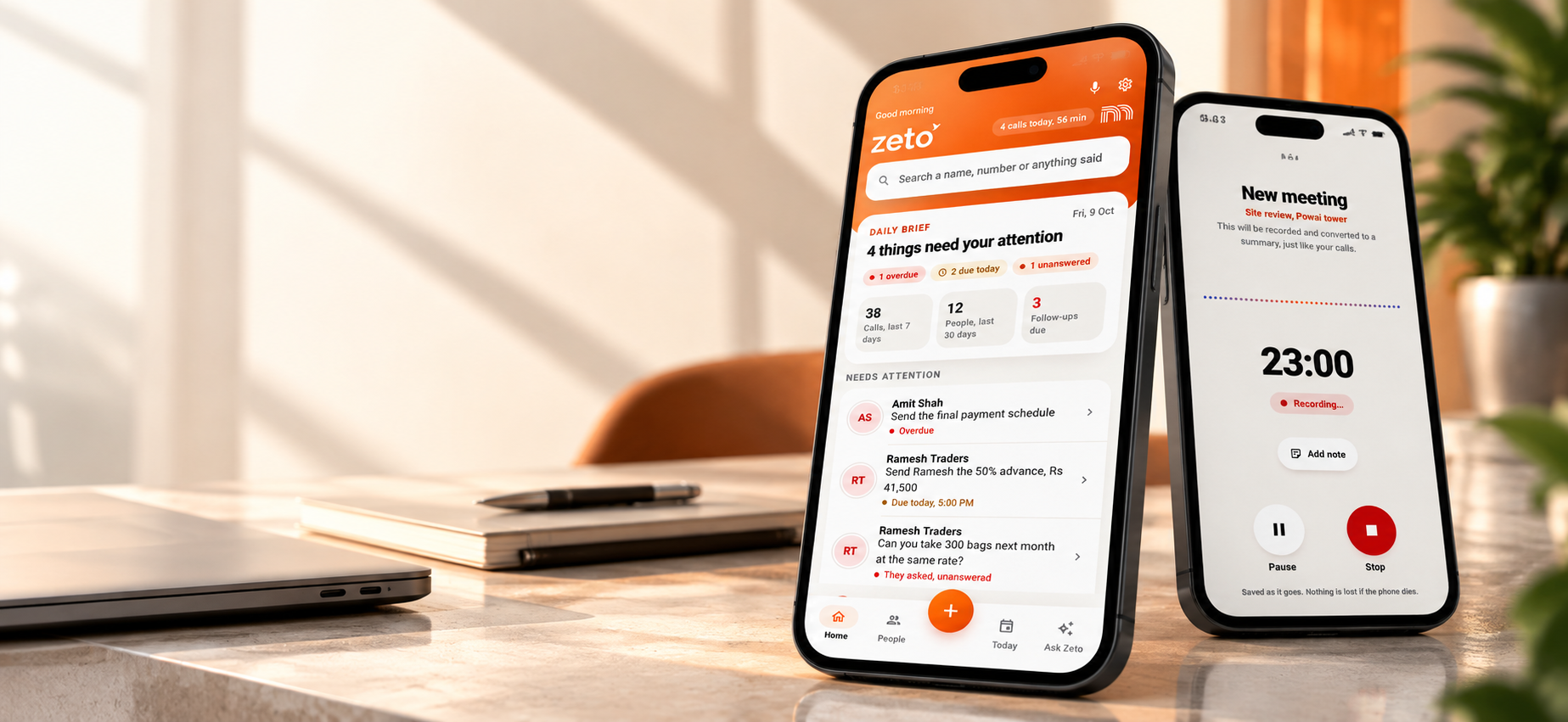
An AI assistant for in-person client meetings should capture permitted audio clearly, organize decisions and action items, handle names and amounts carefully, and make notes searchable later. ZETO AI’s current app descriptions include one-tap in-person meeting capture, summaries, promises, reminders and Ask Zeto queries. Choose based on actual field testing, privacy controls and accuracy rather than a feature checklist alone.
Choose an in-person meeting assistant for accurate capture, decisions, reminders, search and privacy—not just video-call integration. This guide explains the practical workflow, the details worth checking, and how ZETO AI can fit into a real working day.
Why online meeting features are not enough
A great deal of AI meeting software is advertised around video conferencing. Yet many important business discussions still happen face to face: a builder’s office, a warehouse inspection, a consultant’s meeting room or a customer’s showroom.
In those settings there may be no calendar invite, no conferencing bot and no neat list of speakers. People walk around, discuss samples, step away to answer calls and refer to drawings or measurements. An in-person assistant must work with this messier reality.
The goal is not to record everything indiscriminately. It is to capture a permitted conversation clearly enough to preserve what was decided, what remains open and who needs to do something next.
Seven capabilities worth evaluating
Start with direct recording on the device, rather than requiring a video-meeting link. Check whether recording continues when the screen is locked, whether the microphone captures voices across a normal conference table, and whether users receive clear recording status.
Next examine the output. Does the summary identify decisions, open questions, customer requirements and accountable owners? Can someone edit or correct a mistaken name? Can they find the same information a month later without replaying the entire recording?
Finally evaluate privacy and operational fit. Look for consent controls, transparent processing, data export or deletion options, and clear rules about who may access sensitive conversations. These are procurement questions, not optional legal footnotes.
A realistic client meeting at a project site
Consider a consultant meeting a building owner on site. They discuss a problem area, two material options, an approximate budget and access restrictions. The consultant promises to send a site-specific scope by Friday; the owner agrees to share updated drawings.
A useful meeting record would list the observations separately from proposed solutions. It would identify the drawings as an owner action and the scope document as a consultant action. It would not convert the approximate budget into an approved project value.
At the next meeting, the team could ask what was agreed previously and review the source before planning work. This is a hypothetical workflow illustrating how structured meeting memory can reduce repeated questions.
How ZETO AI handles in-person conversation context
ZETO AI’s Android and iPhone descriptions include one-tap recording for meetings and voice notes. The recordings are processed into summaries that identify what happened, what was promised and what remains unanswered. Follow-ups and the Today view are designed to surface outstanding commitments.
Its People history and Ask Zeto capabilities can help someone reconnect a client’s latest instruction with an earlier discussion. That matters when teams visit the same customer repeatedly and requirements evolve.
It is important not to treat recording capability as permission to record. Tell participants when required, follow organizational policies and confirm the captured summary before sharing it.
A practical evaluation checklist for Indian teams
Test the assistant in the types of spaces your team actually uses. A quiet office produces very different audio from a noisy plant or an open-air building site. Try short meetings with consent, then inspect whether the app captures product names, amounts, dates and decisions correctly.
Ask a colleague who attended the meeting to check the summary. Measure how long it takes to locate a particular commitment after several days. Use a simple scoring sheet for transcription accuracy, summary utility, searchability, consent controls and ease of sharing the next step.
An assistant should make a team better prepared without turning every face-to-face conversation into a monitoring exercise. Apply appropriate access controls and use it to support follow-through and fair collaboration.
Practical checklist
- Confirm recording permission and participant awareness.
- Test audio across a real table or site location.
- Review action owners, dates and unresolved questions.
- Check how source conversations are retrieved later.
- Evaluate privacy, access and data deletion controls.
Frequently asked questions
Can AI meeting assistants work without Zoom or Teams?
Yes. Some apps, including ZETO AI according to its listing, provide direct in-person meeting recording on a phone.
Will an AI app identify every speaker correctly?
Do not assume perfect speaker attribution. Verify important statements, especially when several people speak at once.
Can I use this during an industrial site visit?
A permitted recording or voice note may help, but noisy environments can reduce accuracy. Review the result carefully.
Does ZETO AI support in-person meeting recording?
Its published Android and iPhone listings describe one-tap recording of in-person meetings and voice notes.
How is an in-person meeting note different from an online meeting summary?
The outcome may be similar, but the capture method, microphone quality, participant consent and context can differ significantly.
Will a recorded meeting automatically complete tasks?
No. The assistant can organize and surface commitments; people remain responsible for the actual work and confirmation.
Can I search a past in-person meeting?
ZETO AI describes conversation history and Ask Zeto questions about previously captured conversations, with source-backed answers.
How should a company introduce recording to staff?
Explain purpose, permissions, retention and access rules; obtain appropriate consent and provide a clear process for correcting errors.
Sources and further reading
Product information checked against official ZETO AI listings on 28 October 2026. Availability and compatibility may change. Obtain necessary consent before recording; confirm critical details against the original source.